Xit Sensi Training: Android sensitivity presets, crosshair and performance overlay
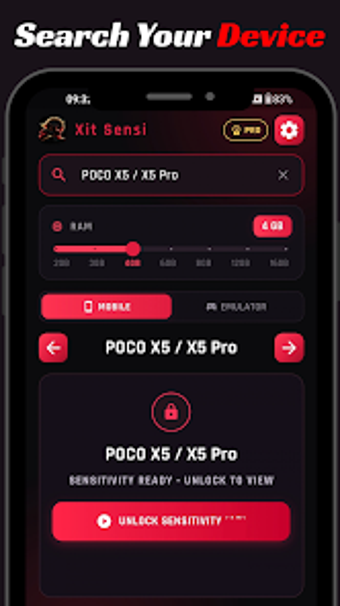
Generates device-specific touch sensitivity presets, draws a customizable crosshair overlay, and shows live FPS, ping, and device temperature while you play. Developed by xSensi as an Android utilities tool, the app bundles a Sensitivity Generator, a 36-design crosshair editor with ten color choices, and a real-time performance monitor. Casual and competitive mobile players who want starting sensitivity values and on-screen diagnostics benefit most from the app’s lightweight, no-registration workflow.
How the app defines and applies sensitivity presets
The Sensitivity Generator supplies tailored presets mapped to major mobile brands and popular emulators, so users get device-specific starting values rather than generic numbers. The tool lists presets per device family and lets you try them in-game through its overlay; this approach provides a repeatable input, meaning you can compare two presets back-to-back without editing game settings manually.
How it interacts with system resources during gameplay
Performance monitoring runs in real time and reports FPS, screen refresh rate, network ping, and battery temperature while the game runs. The source notes the interface is lightweight and fast, which implies minimal runtime overhead. The monitor operates alongside gameplay via the overlay, and its impact is limited by design because the app does not require account sign-up or background services beyond the overlay permission.
Is it safe to use with games and how non-intrusive is it?
Safety relies on overlay-only operation; the app does not read or modify game files, memory, or servers and functions as a visual aid. Because it requires the Display over other apps permission to draw the crosshair and metrics, it avoids touching internal game data. This minimizes interference with anti-cheat mechanisms since the tool only renders graphics on top of the game screen.
Who benefits and how much technical setup is needed
Designed for players who tweak inputs, the app includes fine-grain overlay controls: opacity, size, rotation, and position adjustments. Multi-language support and no registration reduce onboarding friction for international players. Advanced users can experiment with crosshair designs and sensitivity presets; less technical players can apply a suggested preset and observe performance metrics without deep configuration.
Clear utility for players who test and tune controls
The app serves players who need practical starting points for touch sensitivity and on-screen diagnostics, with a modest trade-off: it requires overlay permission to operate. That permission is central to its function, so expect to enable it before use. Recommended.